
A practical guide for financial analysts on architecture, controls, testing, and the long-term costs of owning commission software.
A few years ago, the idea of a financial analyst building an internal sales compensation application would have sounded unrealistic. You could model the calculations in Excel, build a dashboard in Power BI, and ask Engineering to connect the pieces. An actual application, with a database, authentication, workflows, and a user interface, required software engineers.
AI coding agents have changed that. Tools such as Cursor, OpenAI Codex, GitHub Copilot, and Claude Code can write features across multiple files, run commands, troubleshoot errors, and generate tests from plain-language instructions. For an analyst who already understands the compensation plan better than anyone in Engineering, that raises a fair question: could you vibecode (build software by describing what you want to an AI agent) an internal commissions system for your sales team?
Increasingly, yes. But building the first version is the easy part. This guide explains how to build a commission tool that stays accurate and defensible, and it is equally direct about the drawbacks: ongoing maintenance, feature creep, key-person risk, and the point at which building stops making economic sense.
Key Takeaways
- AI coding agents make a homegrown commission tool feasible for a technically curious financial analyst.
- Use AI to write and maintain the calculation code, never to produce the payout numbers themselves.
- Design for historical reproducibility from day one: effective dating, plan versions, source snapshots, and explicit adjustments.
- Your past commission spreadsheets are your best test suite.
- The largest costs arrive after launch: maintenance, feature requests, security reviews, and dependence on the person who built it.
- Decide in advance what would make you stop building and evaluate commercial software.
The Hard Part Is Not Version One
A capable AI agent can produce a working commission calculator in an afternoon. The real test comes six months later, when someone asks:
- Why did this rep receive $14,327.18?
- Which quota was used?
- Which version of the commission plan applied?
- What happened when an opportunity changed after the month closed?
- Can we rerun March and get exactly the same answer?
- Who manually changed this transaction, and why?
- Has the amount sent to payroll changed since it was approved?
A commissions application is a financial system. Payroll, accruals, and sales rep trust all depend on its output, and that fact should shape every decision you make while building it.
Start with the Right Mental Model
The most common mistake is to think: “I already have a spreadsheet that calculates commissions. I just need to turn it into an app.” That approach usually produces a spreadsheet with a user interface bolted on, carrying the spreadsheet’s weaknesses into a system that looks more authoritative than it is.
Instead, think of a commission system as a set of distinct layers:
- Source data: CRM, ERP, billing, and HR records
- Normalized transactions: the fields your engine actually uses
- Crediting: who receives credit for each transaction
- Compensation rules: plans, rates, quotas, and eligibility
- Calculation engine: deterministic code that applies the rules
- Calculation results: line-level commission output
- Adjustments and approvals: explicit, documented corrections
- Reporting: statements, dashboards, and finance views
- Payroll output: locked, approved amounts
- Audit history: a record of every meaningful change
Separating these layers can feel like overkill with five sellers. It becomes essential with 50 sellers, six plans, territory changes, mid-year quota updates, retroactive CRM edits, and a CFO asking why last quarter’s commission expense moved.
Rule 1: Do Not Let AI Calculate Commissions
This may sound contradictory in an article about building with AI. It isn’t.
AI is excellent at helping you write the software that calculates commissions. It should not be the thing that calculates them. Asking a large language model, “Sarah closed $137,000 against a $100,000 quota at a 10% rate with a 1.5x accelerator above quota. What do we owe her?” is fine for exploring an example. It is the wrong architecture for payroll, because language models are probabilistic and can return different or incorrect answers to the same question.
Production calculations belong in deterministic code, such as a function like calculate_commission(transaction, plan_version, quota, attainment). Given identical inputs and the same software version, it must always return the identical result.
The principle: use AI to build and operate the calculation system, not to perform the financial calculation.
A Practical Architecture for a Homegrown Commission System
A simple, sound architecture follows the data from source to payroll:
CRM / ERP / CSV files
  → Data import layer
  → Raw transaction snapshot
  → Normalized commission transactions
  → Crediting engine
  → Plans, quotas, and assignments (effective-dated)
  → Deterministic calculation engine
  → Commission line items
  → Reconciliation, adjustments, and approval
  → Locked payroll batch
  → Rep statements and finance reporting
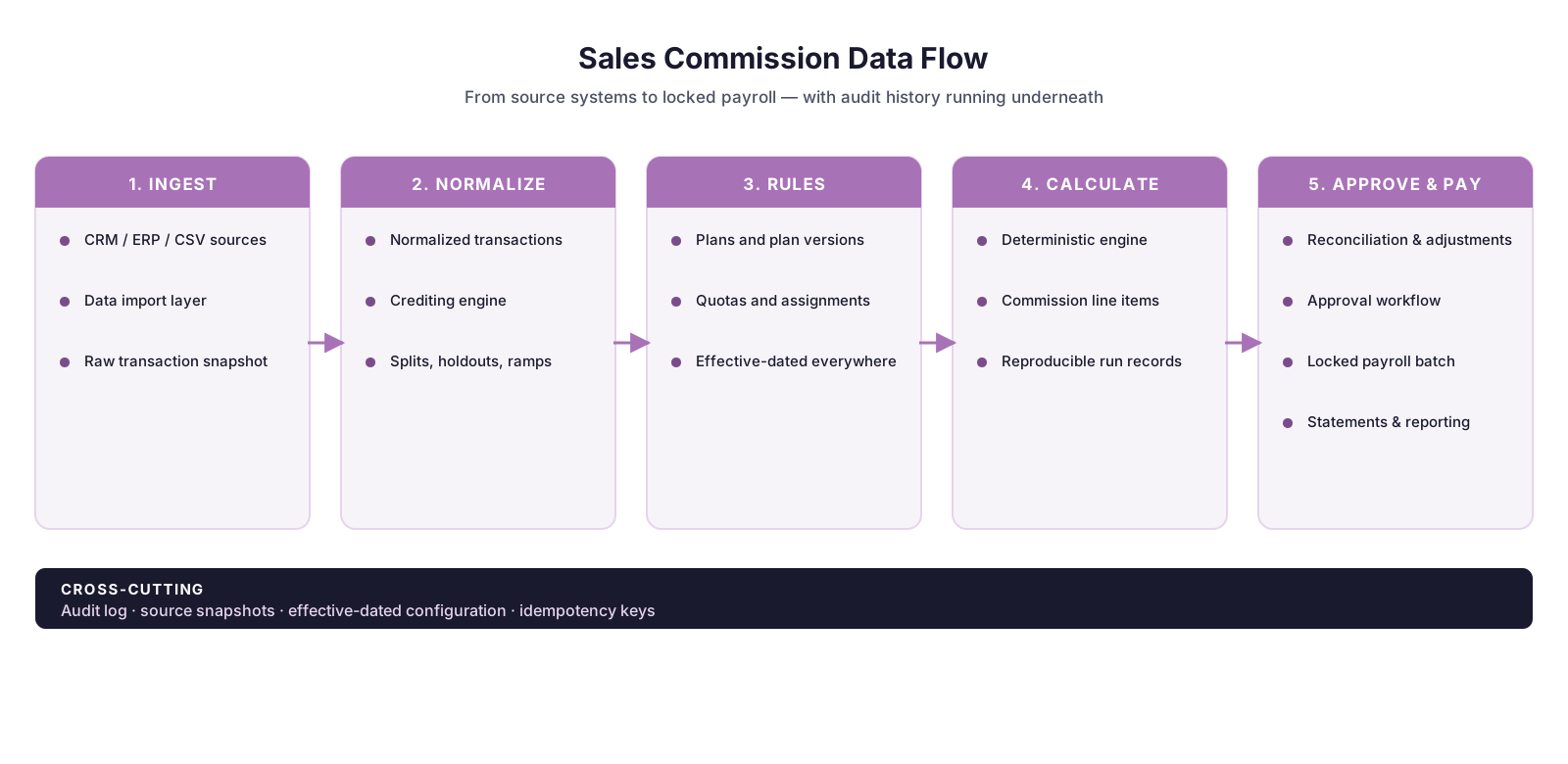
You don’t need ten separate services. For a small internal tool, all of this can live in one application backed by one PostgreSQL database. What matters is that the concepts stay separate in your data model and code.
Design the Database Before the Dashboard
It’s tempting to start with the visible part: “Build me a dashboard showing quota attainment, commission earned, and YTD payout.” An AI agent will produce something impressive quickly. Resist that. A polished dashboard on top of a weak data model is the fastest route to numbers nobody can explain.
Start with the database. A basic data model might include:
| Table | Purpose |
|---|---|
participants |
Salespeople receiving compensation |
plans |
Compensation plan definitions |
plan_versions |
Historical versions of each plan |
assignments |
Which participant was on which plan, and when |
quotas |
Quotas by participant and effective period |
transactions_raw |
Original imported source data |
transactions |
Normalized commissionable transactions |
credits |
Who receives credit for each transaction |
calculation_runs |
Individual commission calculation runs |
commission_lines |
Detailed calculation results |
adjustments |
Explicit manual corrections |
payroll_batches |
Approved amounts sent to payroll |
audit_log |
Record of administrative changes |
The table names can differ. The concepts should not.
Design Principles That Keep Your Numbers Defensible
Use effective dating everywhere it matters
Imagine an account executive starts the year with a $1 million quota, a 10% commission rate, and a 2x accelerator above 100% attainment. On April 1, she moves to a new territory with a $1.4 million quota, an 8% rate, and a 1.5x accelerator.
If you update her record in place, you destroy the history needed to recalculate Q1. Instead, store assignments with start and end dates:
| Rep | Plan | Start | End |
|---|---|---|---|
| Sarah | Enterprise AE v1 | Jan 1 | Mar 31 |
| Sarah | Enterprise AE v2 | Apr 1 | Dec 31 |
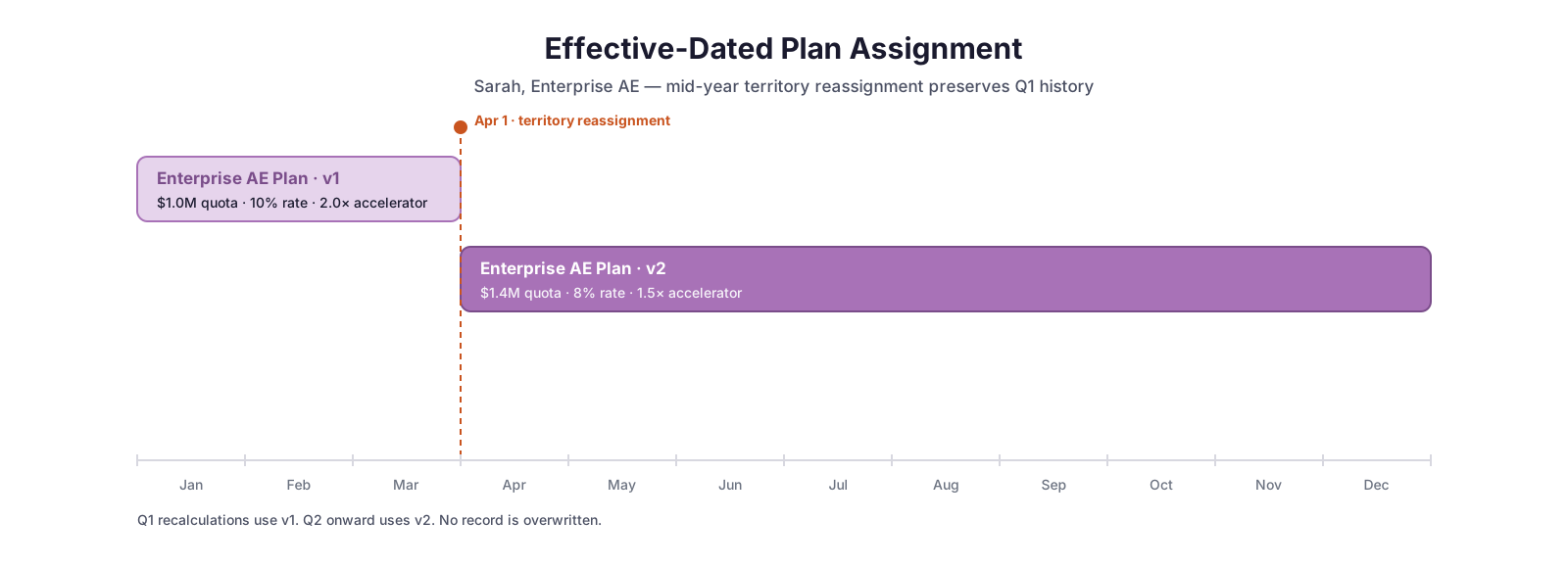
This pattern, called effective dating, should apply to plans, quotas, territories, rates, roles, ramps, draws, and eligibility rules. Your engine should always ask, “What configuration applied on the date relevant to this transaction?” and never, “What does Sarah’s plan look like today?”
The “relevant date” is itself a policy decision. Close date, booking date, invoice date, and payment date can each produce different results, so document which one each plan uses.
Version your compensation plans
If Finance changes an accelerator from 1.5x to 2.0x in July, don’t overwrite the value. Create a new plan version: Enterprise AE Plan v3, effective January 1 through June 30, and v4, effective July 1 onward. Once a version has been used in an approved calculation, treat it as immutable. Every change creates a new version, which gives you the ability to recreate history exactly.
Separate transactions from credits
Avoid a single “deals” table that mixes everything together. A $100,000 opportunity split 60/40 between Sarah and James is still one $100,000 transaction, with two credit records of $60,000 and $40,000. Keeping these concepts apart makes it far easier to support deal splits, overlays, manager rollups, channel and SDR credit, team credit, and multiple plans that reference the same deal. It also makes troubleshooting much simpler.
Snapshot the source data you calculated against
CRM data changes constantly. Amounts get revised, owners change, close dates move, and products get reclassified. If your tool always reads the current CRM record, historical calculations can change silently.
Store three views of each transaction: the raw import exactly as received, the normalized transaction your engine used, and the current source value. Comparing them lets you flag that an opportunity has changed since commissions were calculated, so Finance can decide whether the change warrants an adjustment. Preserving that separation between mutable CRM data and immutable commission history is one of the most valuable disciplines you can build in from day one.
Create adjustments instead of rewriting history
Suppose March commissions have been paid, and in May you discover Sarah was owed another $700. Don’t edit March from $12,400 to $13,100. Keep the approved March payment intact and create a May adjustment of +$700 that references March. The same approach handles negative corrections and clawbacks.
Your system should distinguish between what was mathematically earned and what was actually paid, because those are not always the same number.
Treat every calculation as a reproducible run
Each time commissions are calculated, create a run record (for example, calculation_run_id = 2026-03-31-004) that captures the calculation period, timestamp, source data snapshot, plan and quota versions, software version, the person who initiated it, and its status. Every commission line should reference its run.
You can then compare Run 003 ($482,191 total) with Run 004 ($485,773 total) and show exactly which transactions drove the $3,582 difference. That capability is invaluable during month-end close.
Make processing idempotent
Idempotent means that running the same job twice with the same inputs produces the same result, not two sets of commissions. If someone clicks “Calculate” twice, no one should be paid twice. Unique identifiers and database constraints can enforce this for transactions, credits, and payouts.
Use exact decimal math and a written rounding policy
Never calculate or store money as floating-point numbers, which introduce small binary rounding errors. Use decimal types in both the database and the code. Also decide, in writing, where rounding happens: on each commission line, on each rep’s total, or at payroll export. Inconsistent rounding is one of the most common reasons a rebuilt calculation misses the spreadsheet by a few cents.
Build the engine from small, reusable components
Don’t ask your coding agent for one enormous function that handles every possible plan. Build components with clear inputs and outputs:
| Component | Inputs | Output |
|---|---|---|
| Revenue commission | Credited revenue, commission rate | Commission amount |
| Quota accelerator | Attainment, accelerator bands | Applicable multiplier |
| New logo SPIFF | Qualifying transaction, fixed bonus | SPIFF payment |
| MBO | Achievement percentage, target incentive | MBO payment |
A compensation plan then becomes a configuration that combines components, which is far easier to test and maintain than custom code generated for each plan.
Turn Past Payouts into Regression Tests
Financial analysts have a major advantage over engineers building a new system: you already know the correct answers.
Take the last three to six months of verified commission calculations and convert them into automated regression tests at three levels:
- Total: Given this transaction file, these quotas, these plans, and these assignments, total commissions must equal $437,821.72.
- Participant: Sarah must receive $14,327.18.
- Transaction: Opportunity 006782 must generate $3,412.50 of commission for Sarah.
Run every test whenever the calculation engine changes. If a result shifts from $14,327.18 to $14,329.81, the deployment should fail before a sales rep discovers the difference.
Two cautions apply. First, your historical spreadsheet may contain errors of its own. When the new system disagrees with it, investigate both sides before assuming the code is wrong, and document any spreadsheet errors you find. Second, when a code change breaks a test, some AI agents will “fix” the failure by editing the test’s expected value rather than the code. Treat regression test files as controlled financial records, require human review for any change to them, and instruct your agent never to modify expected results without explicit approval.
Use Version Control from Day One
Even as a solo builder, keep your code in GitHub or a similar Git repository and commit every meaningful change. “I changed how accelerators work” becomes “commit 3f72b1 changed accelerator calculations.” That lets you review, reverse, and compare changes, pinpoint when a bug was introduced, and give AI agents useful context about how the application evolved.
Set up continuous integration, such as GitHub Actions, to run your test suite automatically on every change and block merges when tests fail. For financial software, this is worth doing early.
Choosing a Technology Stack
There is no single correct stack, but simplicity is a feature. Boring architecture is good architecture for payroll.
AI coding environment
Cursor, OpenAI Codex, GitHub Copilot, and Claude Code can work across an existing repository rather than generating isolated snippets. That lets you express requirements in business language, such as: “When an administrator changes a quota retroactively, don’t overwrite it. Create a new effective-dated version and identify the calculation periods affected.” That is much closer to writing compensation policy than to traditional programming.
Database
A relational database such as PostgreSQL is a natural fit for the structured relationships among participants, plans, quotas, transactions, credits, calculations, and adjustments. Managed platforms such as Supabase bundle PostgreSQL with authentication and support PostgreSQL’s row-level security.
Front end
React with Next.js is a common choice for administrator screens, rep dashboards, plan configuration, transaction drill-downs, and approval pages. Hosting platforms such as Vercel simplify deploying Next.js applications directly from a Git repository.
Back end and calculation engine
TypeScript, Python, serverless functions, or API routes all work. If your team already maintains commission logic in Python, keeping the calculation engine in Python is perfectly reasonable. Don’t adopt a technology just because your AI agent knows how to use it. Every added component is something you will have to maintain.
Internal administration
If you don’t want to build every admin screen yourself, low-code tools such as Retool can sit on top of your database and APIs. A common split is a custom seller-facing interface paired with a low-code administration interface for Finance.
Security, Access, and Data Governance
Your application will hold compensation, employee information, sales performance, customer transactions, and payroll data. Plan for security from the start.
- Authentication: Users should log in through company-managed identities, ideally single sign-on, never shared passwords.
- Authorization: Reps see their own compensation, managers see their teams, Finance sees everyone, and only administrators change configuration. Enforce this in the database with row-level security, not just by hiding data in the interface.
- Secrets: Keep CRM credentials, database passwords, and API keys out of source code. Use environment variables or a secrets manager.
- Environment separation: Keep development, testing, and production separate. Your AI coding agent should not have casual access to production payroll data.
- AI data policies: Check your company’s policy before putting real compensation or employee data into any AI tool. Use anonymized or synthetic data for development wherever possible.
- IT and security review: In most companies, an application that handles payroll data needs approval from IT or Security. Engage them early, because discovering that requirement after launch is far more painful.
Controls: Audit Logs, Period Locking, and Monitoring
Build an audit log before you think you need one
Every important administrative action should record who made the change, when, the previous and new values, the affected object, and a reason where appropriate. For example:
April 14, 10:42 AM: M. Chen (Sales Ops) changed Sarah’s Q2 quota from $1,200,000 to $1,100,000. Reason: territory realignment.
May 3, 2:17 PM: Adjustment of +$725 created, referencing opportunity 006782.
Without an audit trail, troubleshooting becomes archaeology.
Lock approved periods
Once Finance approves commissions and sends them to payroll, lock the period. Locking doesn’t mean nothing can ever change. It means changes require an explicit adjustment rather than a silent rewrite of an approved result. A reasonable workflow is:
Draft → Calculated → Reviewed → Approved → Sent to Payroll → Locked
Permissions should become progressively stricter as a period advances through each stage.
Monitor the system, even if it’s small
Something will eventually fail: a CRM import stops, an API token expires, a calculation job crashes, or a deployment introduces a bug. You need to know before payroll week. At minimum, monitor failed imports and jobs, application errors, missing source files, unexpected changes in transaction counts, and large payout variances.
One of the most useful controls is also the simplest: “Yesterday we imported 4,200 opportunities. Today we imported 17.” That should trigger an alert and an investigation.
Write Standing Rules for Your AI Coding Agent
Vibecoding becomes far more reliable when you stop prompting from scratch and give the agent permanent, repository-level instructions. Most coding agents support a project rules or instructions file. For a commission tool, those rules might include:
- Never overwrite effective-dated configuration.
- Never modify an approved or locked payroll record.
- Use decimal types for all monetary values, never floating-point.
- Every calculation rule requires unit tests.
- Never change expected values in regression tests without explicit human approval.
- Every database migration must be reversible.
- Never expose compensation data without an authorization check.
- Every manual change must write an audit record.
- Retroactive changes create adjustments and never modify locked payouts.
- Never deploy when tests fail.
This is how a financial analyst turns accounting and compensation controls into engineering standards.
Accounting and Compliance Considerations
A homegrown tool has to meet the same requirements as a commercial one. Review these areas with your controller, auditors, and legal counsel before relying on the tool. This section is general information, not accounting or legal advice.
- Commission capitalization: Under U.S. GAAP (ASC 340-40), incremental costs of obtaining a customer contract, which often include sales commissions, are generally capitalized and amortized over the period of benefit, with a practical expedient that allows expensing when the amortization period would be one year or less. Your tool may need to supply the data your accounting team uses for these schedules, or at least tie out to them.
- Accruals: Finance typically accrues earned but unpaid commissions at period end. Make sure the tool can report earned versus paid amounts by period. For a closer look at how CFOs think about this, see our guide to sales compensation accrual accuracy.
- IT general controls: If your company is public, preparing for an IPO, or otherwise subject to SOX-style audits, auditors may test change management, access reviews, and segregation of duties for systems that feed the financial statements. A tool that one person builds, deploys, and administers can struggle to meet segregation-of-duties expectations.
- Written plan agreements: Some jurisdictions regulate commission plans directly. California, for example, requires written, signed commission agreements that describe how commissions are computed and paid. Your tool’s logic should match the signed plan documents exactly.
The Drawbacks: What the Demo Doesn’t Show
Everything above describes how to build a commission tool well. This section covers the costs that tend to surface only after launch. None of them is a reason never to build, but each deserves an honest place in your decision.
Maintenance never ends
Software that works today will not keep working on its own. CRM and payroll vendors change and retire API versions. Authentication tokens expire. Open-source libraries publish security patches that need to be applied. Hosting platforms change pricing and features.
The business changes too. Most companies revise compensation plans at least annually, and reorganizations, acquisitions, and new roles each require configuration or code changes. Budget recurring time for maintenance from the start, not just for the initial build.
Feature creep turns a calculator into a product
The first version calculates commissions. Then reps want a dashboard. Managers want a what-if calculator. Sales leadership launches a mid-quarter SPIFF. Finance wants accrual reports. HR asks for plan acknowledgments. Someone requests Slack notifications, a dispute workflow, multi-currency support, and an export for the board deck.
Each request is small and reasonable. Together, they turn a financial analyst into a part-time product manager, support desk, and on-call engineer.
AI makes this harder to resist in one specific way: because each feature is fast to build, it becomes harder to say no. AI lowers the cost of building a feature, but not the cost of owning it. Every feature adds code that must be maintained, tested, and secured.
Guardrails that help:
- Write a one-page scope document that includes an explicit “not building” list.
- Route feature requests through a simple intake process with a named decision-maker.
- Ask of every request whether it affects payout accuracy, controls, or compliance. If it doesn’t, defer it.
- Periodically remove features nobody uses.
Key-person risk
Homegrown tools often depend on the one person who built them. If that analyst is promoted, changes teams, goes on leave, or leaves the company, the organization inherits a business-critical payroll system that nobody fully understands.
Mitigate this with documentation, a trained backup owner, code kept in a company-owned repository, and written runbooks for month-end processes. If you can’t name a second person who could run payroll week without you, the risk is real.
AI-generated code you don’t fully understand
Vibecoding lets you ship code faster than you can read it. That’s acceptable for a prototype and risky for payroll. AI agents can introduce subtle logic errors, insecure patterns, or unnecessary dependencies while the application appears to work normally. We’ve covered the specific failure modes in more depth in our companion piece on the risks of vibecoding a sales commission tool.
Keep the calculation engine small and readable, require every calculation change to pass regression tests, ask the agent to explain each change in plain language before you accept it, and consider periodic reviews by an experienced engineer, particularly for authentication and data access code.
Rep trust and dispute handling
Sellers scrutinize their paychecks closely. A single visible error from a homegrown tool can undermine confidence in every statement that follows, and reps who stop trusting the numbers start keeping shadow spreadsheets of their own.
You’ll need a clear dispute process: how reps raise questions, who investigates, how quickly they receive answers, and how corrections flow through as adjustments.
The true cost of ownership
Software built with an inexpensive AI subscription is rarely inexpensive to own. A realistic cost comparison includes:
| Cost category | What to include |
|---|---|
| Build time | Analyst hours for design, development, testing, and parallel runs against the existing process |
| Ongoing maintenance | Monthly hours for fixes, updates, plan changes, and integration upkeep |
| Infrastructure | Hosting, database, monitoring, backups, and AI tool subscriptions |
| Security and compliance | IT review, access reviews, audit support, and penetration testing if required |
| Engineering support | Time borrowed from engineers for code reviews, incidents, and escalations |
| Error risk | Payout mistakes, overpayments that are difficult to recover, and time spent on disputes |
| Opportunity cost | The analysis, forecasting, and plan design work the analyst isn’t doing |
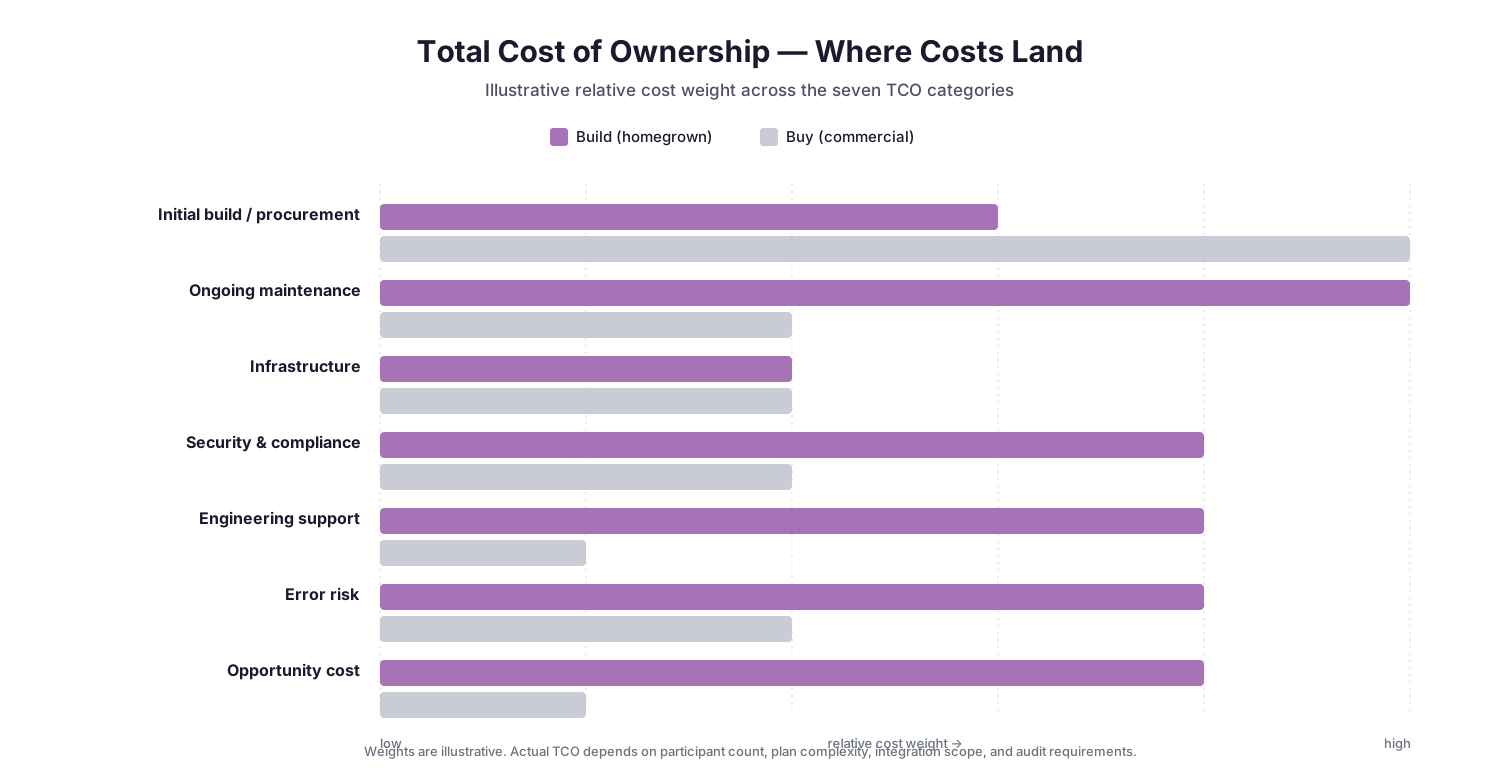
Compare that total over two to three years, not just the initial build, with the cost of commercial software for your participant count.
A Phased Development Plan
If you decide to build, don’t start by recreating an enterprise compensation platform. Build incrementally, and validate each phase before starting the next.
Phase 1: Calculation engine
Import CSV data. Store transactions, participants, quotas, and plans. Calculate commissions. Run the tool in parallel with your existing spreadsheet for multiple pay periods and reconcile every difference. Skip the polished interface.
Phase 2: Reconciliation
Add transaction drill-downs, calculation runs, variance analysis, adjustments, and historical comparison.
Phase 3: Administration
Add participant onboarding, quota management, plan assignments, effective dating, and plan versioning.
Phase 4: Workflow and controls
Add approvals, period locking, payroll export, and audit history.
Phase 5: Seller experience
Add rep dashboards, commission statements, attainment tracking, transaction detail, and estimated earnings.
By the end of Phase 5, you’ve built a substantial system. At the end of each phase, pause and ask whether the next phase is worth owning, or whether this is the right moment to evaluate commercial software.
Build vs. Buy: When to Stop Building
You can probably vibecode something that works. That doesn’t mean continuing to build is the economically rational choice.
The case for building is strongest when you have:
- A small number of participants and plans that change infrequently
- A technically capable owner with a named backup
- Compensation logic that off-the-shelf tools handle poorly
- Leadership that explicitly accepts the ongoing maintenance commitment
The case for buying grows as you add:
- Hundreds or thousands of participants
- Multiple countries, currencies, or legal entities
- Complex reporting hierarchies and crediting rules
- Many compensation plans or frequent plan changes
- Frequent acquisitions or reorganizations
- Payroll and HRIS integrations
- Enterprise single sign-on and formal access reviews
- SOX, audit, or other regulatory requirements
- Disaster recovery and uptime expectations
- A need for support outside business hours
There are also middle paths:
- Prototype, then buy. A vibecoded prototype is an excellent way to clarify your requirements before evaluating vendors. Your regression tests can double as acceptance tests: any platform you consider should reproduce your verified historical payouts.
- Build around the edges. Buy a platform for core calculations, approvals, and payroll controls, and build lightweight internal tools for analysis, forecasting, or plan modeling where mistakes don’t flow directly into paychecks.
For a structured framework on the buy decision, see our FP&A-led comparison of commission tracking platforms and the CFO buyer’s guide to commission tracking software.
The right question isn’t “Can AI build our commissions application?” Increasingly, it can. The better question is: which parts of sales compensation should we own ourselves, and which parts are no longer worth owning?
Conclusion: AI Makes Building Easier, Not Ownership
AI coding tools make custom internal applications dramatically more accessible, and sales compensation is a natural candidate, because the people who understand the requirements (Finance, RevOps, and sales compensation teams) can now participate directly in building the software. An analyst can describe a policy such as “if an opportunity changes after the period is locked, calculate the commission difference and create an adjustment in the current open period,” and an agent can translate it into database changes, application logic, tests, and screens.
The teams that succeed won’t be the ones that generate the most code. They’ll be the ones that impose the most discipline on it: immutable history, effective dating, deterministic calculations, automated testing, reconciliation, explicit adjustments, access controls, approval workflows, and auditability. They’ll also go in with a clear view of what ownership costs over years, not weeks.
Vibecoding makes creating the software easier. It doesn’t make financial controls, maintenance, or accountability optional.
Frequently Asked Questions
Can a financial analyst build a sales commission tool with AI?
Increasingly, yes. AI coding agents can generate application code, database schemas, tests, interfaces, and deployment configuration from plain-language requirements. Someone still needs to define the business rules, validate the architecture, verify results against known payouts, and own the system after launch.
Should AI calculate sales commissions directly?
No. AI should help write and maintain the software, but production calculations should run in deterministic code so that the same inputs and rules always produce the same payout.
What database should I use for a commission system?
A relational database such as PostgreSQL is a strong fit, because commission data consists of structured relationships among participants, plans, quotas, transactions, credits, calculations, and payouts.
What is the most important feature to design first?
Historical reproducibility. Your tool should be able to show exactly which plan version, quota, territory, rate, and source data applied when each commission was originally calculated.
How should retroactive CRM changes be handled?
Don’t rewrite previously approved payouts. Detect the source change, calculate its financial impact, and when appropriate, create an explicit adjustment in the current open period that references the original transaction.
What are the biggest risks of building your own commission software?
The most common risks are ongoing maintenance, feature creep, dependence on a single builder, unnoticed errors in AI-generated code, security and audit gaps, and loss of rep trust after visible payout mistakes.
How much does it cost to maintain a homegrown commission tool?
It depends on complexity. The total includes analyst and engineering time for fixes and plan changes, infrastructure and tool subscriptions, security and audit support, the cost of payout errors, and the opportunity cost of the builder’s time. Estimate it over two to three years rather than looking only at the initial build.
How do I decide whether to build or buy commission software?
Weigh participant count, plan complexity, integration needs, security and audit requirements, support expectations, and whether you have a technically capable owner with a backup. AI has lowered the cost of building custom software, but not the long-term cost of owning business-critical financial systems.